
SEO-Friendly Web Design: What You Need to Know

SEO-Friendly Web Design: What You Need to Know
SEO-friendly web design is the practice of building websites optimized for both search engine ranking and user experience simultaneously, starting from the very first design decision. This is not a checklist you bolt on after launch. It is a unified discipline where Google Core Web Vitals, W3C Accessibility Guidelines, semantic HTML, and responsive layouts all work together from day one. Get this right and you get better rankings, lower bounce rates, and visitors who actually stick around. Get it wrong and you spend months doing expensive rework that a little upfront planning would have prevented. Whether you are a web designer or a business owner, understanding what makes a website SEO-friendly is one of the highest-return skills you can develop.
What is SEO-friendly web design, and why does it matter?
SEO-friendly web design is defined as the integration of technical SEO principles directly into design decisions, so that every layout choice, heading structure, and navigation pattern supports both search engine crawlers and real human visitors. The industry standard term for this unified practice is “SEO-integrated design,” though most practitioners simply call it SEO web design basics.
The benefits of SEO-friendly design are concrete, not theoretical. Sites built this way rank higher because search engines can crawl and understand them. They convert better because visitors find what they need fast. They cost less to maintain because SEO is baked in rather than patched on. Think of it like building a house with proper wiring from the start versus trying to add electricity after the walls are up. One approach is clean and efficient. The other is a nightmare.

Well-designed websites that integrate SEO from the earliest development stages consistently outperform sites where design and SEO are treated as separate projects. The gap in performance is not subtle. It shows up in rankings, traffic, and revenue.
What design elements directly impact SEO performance?
The elements of SEO-friendly design fall into five core categories, and each one sends direct signals to search engines.
Mobile-first, responsive layouts
Google indexes the mobile version of your site first. This is called mobile-first indexing, and it means your desktop design is essentially secondary. A responsive layout serves the same content across all screen sizes without requiring separate URLs. That simplifies crawling and improves rankings. If your site still uses a separate “m dot” subdomain or a fixed-width layout, you are already behind.
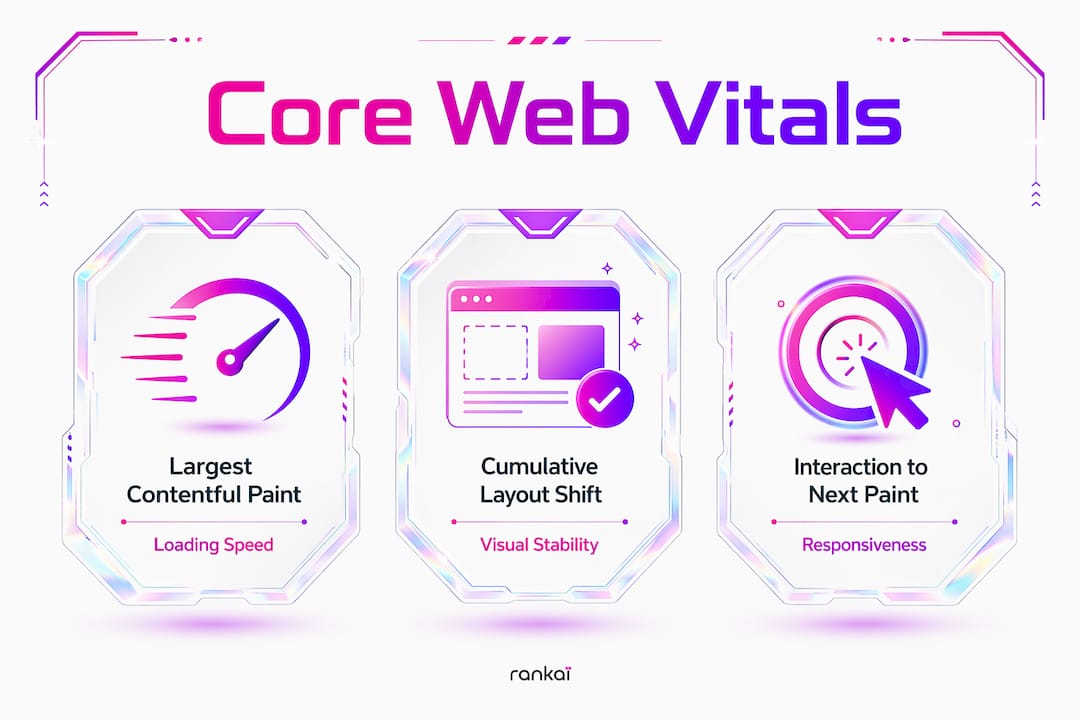
Page speed and Core Web Vitals
Google’s Core Web Vitals, specifically Largest Contentful Paint (LCP), Cumulative Layout Shift (CLS), and Interaction to Next Paint (INP), are confirmed ranking signals tied directly to front-end design choices. An LCP under 2.5 seconds is the recommended threshold for ranking benefits and user retention. That number is determined by decisions like image formats, font loading strategy, and how much JavaScript runs before the page renders. These are design and engineering calls, not afterthoughts.
Semantic HTML and heading hierarchy
Using correct HTML5 elements, including proper H1 through H6 tags, article tags, and nav tags, tells search engines exactly what each part of your page means. Semantic HTML and alt text improve both accessibility and crawlability at the same time. A page where every section is wrapped in a generic div tells Google almost nothing. A page with proper semantic structure is like a well-labeled filing cabinet.
Clean URLs and logical site architecture
Important pages should sit within two or three clicks of your homepage. Descriptive URLs that reflect your keyword research help both crawlers and visitors understand what a page covers before they even land on it. Compare /services/web-design to /page?id=47. One is readable and rankable. The other is neither.
Internal linking with descriptive anchor text
Internal links with descriptive anchor text distribute page authority across your site and help search engines discover content they might otherwise miss. Navigation menus, footer links, and in-content links all contribute. Vague anchor text like “click here” wastes this opportunity entirely.
Pro Tip: Run your site through Google Search Console’s URL Inspection tool on every major page after launch. It shows exactly what Googlebot sees, including whether your mobile layout renders correctly and whether internal links are being followed.
How does accessibility boost SEO and user engagement?
Accessibility and SEO are not parallel tracks. They are the same track. W3C’s Web Content Accessibility Guidelines overlap strongly with SEO goals because both require content that machines and humans can understand equally well.
Here is what that looks like in practice:
- Alt text on images describes visual content for screen readers and gives search engines context for indexing images correctly.
- Keyboard navigation keeps users engaged who cannot use a mouse, which reduces bounce rates and improves time on page.
- ARIA labels on interactive elements like buttons and forms help assistive technologies interpret your UI, and they also clarify page structure for crawlers.
- Sufficient color contrast (a minimum ratio of 4.5:1 for normal text per WCAG 2.1) makes text readable for users with low vision and prevents content from becoming invisible on certain screens.
- Logical reading order in the DOM ensures that both screen readers and search engine bots process your content in the intended sequence.
The business case for web accessibility and SEO is straightforward. Sites that meet WCAG standards tend to have lower bounce rates and longer session durations. Search engines interpret those engagement signals as quality indicators. You improve accessibility, and rankings follow.
Pro Tip: Use the free axe DevTools browser extension to audit your pages for accessibility violations before launch. It catches the most common WCAG failures in under five minutes and maps each issue directly to a fix.
How should you structure site architecture and navigation for SEO?
Site architecture is the skeleton of your SEO strategy. A poorly organized site forces search engines to guess which pages matter most. A well-organized one makes that obvious.
- Keep your hierarchy shallow. Every important page should be reachable within two or three clicks from the homepage. Deep hierarchies bury content from both crawlers and visitors.
- Use descriptive navigation labels. “Services” tells a visitor something. “What We Do” tells them almost nothing. “Web Design for Startups” tells them exactly what they need to know and includes a keyword.
- Add breadcrumb trails. Breadcrumbs create secondary navigation paths that reinforce your site hierarchy for both users and crawlers. They also appear in Google search results as rich snippets, which improves click-through rates.
- Include footer links to key pages. Footer links give crawlers an additional path to your most important content, especially on pages that sit deeper in your hierarchy.
- Avoid orphan pages. An orphan page has no internal links pointing to it. Search engines may never find it, and even if they do, they will treat it as low priority.
One common mistake worth calling out: heavy reliance on client-side rendering. When JavaScript builds your page content after the initial HTML loads, crawlers may see an empty page on the first pass. Server-side rendering or static site generation avoids this problem entirely and is a much safer default for SEO.
| Architecture pattern | SEO impact |
|---|---|
| Shallow hierarchy (2–3 clicks) | High crawl efficiency, strong page authority flow |
| Descriptive, keyword-rich URLs | Better indexing and click-through rates |
| Orphan pages | Low discoverability, wasted crawl budget |
| Client-side-only rendering | Risk of incomplete indexing |
How do you integrate SEO best practices into your design workflow?
The biggest mistake in SEO web design is treating SEO as a final checklist. Designers and businesses that unify SEO and design from the start avoid costly redesigns and build sites that rank from day one. Here is how to do it right.
- Start at the wireframe stage. Decide your URL structure, heading hierarchy, and navigation labels before you write a single line of CSS. These decisions are much harder to change after a site is built.
- Choose themes and templates with semantic HTML baked in. Not all templates are created equal. A template that uses div soup instead of proper HTML5 elements will require significant cleanup before it is SEO-ready.
- Build a design system. Design systems that codify SEO-friendly components ensure every new page automatically inherits correct heading structure, optimized image handling, and responsive behavior. This reduces manual SEO upkeep as your site grows.
- Measure after launch. Google Search Console, PageSpeed Insights, and Lighthouse give you real data on how your design decisions affect crawlability and Core Web Vitals scores. Treat launch as the beginning of iteration, not the end.
- Avoid the “we’ll fix SEO later” trap. Applying SEO as an afterthought leads to technical debt that compounds over time. URL restructuring, heading rewrites, and image optimization retrofits are all expensive and disruptive.
The startup layout strategies that perform best in 2026 share one trait: SEO and UX decisions were made together, not in sequence.
Pro Tip: Create a one-page SEO brief before any design project kicks off. It should cover target keywords per page, URL structure, heading hierarchy, and image alt text conventions. Hand it to your designer alongside the creative brief, not after.
Key Takeaways
SEO-friendly web design requires integrating technical SEO directly into design decisions from wireframing through launch, not as a post-production checklist.
| Point | Details |
|---|---|
| Start SEO at wireframe stage | URL structure, headings, and navigation labels are harder to fix after build. |
| Mobile-first is non-negotiable | Google indexes the mobile version first, so responsive design directly affects rankings. |
| Core Web Vitals are design decisions | LCP, CLS, and INP scores depend on layout, images, and JavaScript choices made during design. |
| Accessibility and SEO share goals | WCAG-compliant sites earn better engagement signals, which search engines treat as quality indicators. |
| Design systems scale SEO | Codified, reusable components ensure every new page inherits SEO best practices automatically. |
What I have learned from treating SEO and design as one job
Here is my honest take after working with startups on this exact problem: the designers who treat SEO as “the developer’s job” and the business owners who think SEO is “something you do after the site is live” are both setting themselves up for a painful (and expensive) rebuild conversation six months down the road.
At Coumba Win Design, we treat SEO constraints the same way we treat brand guidelines. They are parameters that shape every decision, not a filter applied at the end. When we worked on an educational platform redesign, the heading hierarchy and URL structure were locked in before the first mockup was approved. That single decision saved weeks of post-launch cleanup and contributed to measurable ranking improvements within the first quarter.
The thing that surprises most founders is how much SEO-friendly design improves the user experience too. Clean navigation, fast load times, and logical page structure are not just good for Google. They are good for the actual humans using your site. When you build for both, you stop making tradeoffs and start making better products.
The role of accessibility in UX is one area where I see the most missed opportunity. Founders skip it because it feels like a compliance exercise. In reality, it is one of the highest-leverage SEO moves available, and it costs almost nothing when you build it in from the start.
— Coumba Evelyn
How Coumba Win Design builds SEO into every project
Coumba Win Design builds every website with SEO and accessibility principles embedded from the first wireframe, not added as a final pass.
The Coumba Win components library is built on semantic HTML, responsive layouts, and WCAG-compliant patterns, so every page you build with it starts from a strong SEO foundation. No retrofitting required. If you are a founder or designer ready to build a site that ranks and converts from day one, Coumba Win is the design partner built for exactly that kind of work.
FAQ
What is SEO-friendly web design?
SEO-friendly web design is the practice of integrating technical SEO principles, including responsive layouts, semantic HTML, fast load times, and logical site architecture, directly into the design process from the start.
How does responsive design affect SEO?
Google uses mobile-first indexing, meaning it crawls and ranks the mobile version of your site. A responsive design ensures consistent content across devices, which directly supports higher rankings.
What are Core Web Vitals and why do they matter for design?
Core Web Vitals (LCP, CLS, and INP) are Google ranking signals determined largely by front-end design choices like image formats, layout stability, and JavaScript load order. An LCP under 2.5 seconds is the recommended benchmark.
Does accessibility really improve SEO?
Yes. W3C accessibility standards like alt text, keyboard navigation, and ARIA labels improve how both search engines and users understand your content, which lowers bounce rates and raises engagement signals that Google rewards.
When should SEO be added to a web design project?
SEO should be integrated at the wireframe stage, before any visual design begins. Adding it after launch leads to technical debt and expensive restructuring of URLs, headings, and navigation.
Recommended