One Hour Website Accessibility Statement Template for US Founders

One Hour Website Accessibility Statement Template for US Founders
A website accessibility statement is a short public page that declares your commitment to accessibility and, at minimum, names the technical standard you follow, lists known limitations, and gives clear contact and feedback channels. Skip any one of those three pieces and you have a nice paragraph, not a real statement. The good news: you can build one, correctly, in about the time it takes to read this article.
TL;DR:
- A website accessibility statement must include a clear commitment, the specific standard (usually WCAG 2.1 or 2.2 AA), known limitations with workarounds, a contact method, and recent audit details.
- Placing the statement in the footer on every page with a visible last updated date and periodic reviews ensures users and regulators can find and trust it.
- Use plain language to describe limitations and workarounds directly, avoiding technical jargon like “WCAG 2.1 AA not met,” to build trust and clarity.
- Conduct manual accessibility testing alongside automated scans and include feedback from real assistive technology users for a more accurate assessment.
- Publishing an honest, regularly updated statement focused on transparency helps build trust more effectively than a polished but outdated or overly technical declaration.
Table of Contents
- What To Include In A Website Accessibility Statement
- Two Statement Examples Plus A Template You Can Reuse
- Where To Publish It And How To Keep It Current
- How To Write It: Plain Language Over Jargon
- How An Agency Frames The Accessibility Statement
- Why Most Accessibility Statements Undersell Themselves
- Sources
- FAQ
What To Include In A Website Accessibility Statement
Every statement worth publishing has the same skeleton. Miss a piece and users (or regulators) will notice fast.
- Commitment statement. One or two sentences saying who is covered (“this policy applies to our website, mobile site, and customer portal”) and why accessibility matters to your organization.
- Named standard. State the exact benchmark, usually WCAG 2.1 or 2.2 at the AA level, and say plainly whether you fully conform, partially conform, or are working toward conformance. Vague language like “we strive for accessibility” without naming a standard tells auditors and users nothing.
- Known limitations, in plain words. If a legacy PDF library isn’t tagged or an embedded video lacks captions, say so and list a workaround (a phone line, a text alternative, an email request line).
- Contact and feedback channel. An email address, a form, or a phone number, plus a realistic response window. Section508 recommends pairing the feedback mechanism with a stated response expectation specifically because it cuts down on formal complaints.
- Testing and maintenance notes. When you last audited the site, what methods you used, and who owns the fix list.
Pro Tip: Deadlines are already moving. Policy reporting on the Department of Justice’s ADA rulemaking points to WCAG 2.1 AA conformance deadlines starting in April 2026 for larger state and local government entities, with smaller jurisdictions given additional time. If you serve public-sector clients or operate as one, that date belongs on your calendar now, not after a complaint lands.
None of this needs legal jargon. It needs specifics.
Two Statement Examples Plus A Template You Can Reuse
Seeing the format in action makes it click faster than any checklist. Here are two lengths, then a fill-in-the-blank version.
- Minimal statement (small site, low risk profile): “We are committed to making our website usable by everyone. We aim to meet WCAG 2.1 Level AA. Some older PDFs are not yet fully tagged; email accessibility@yourcompany.com and we’ll provide the content in an alternative format within a reasonable time frame.”
- Complete statement (higher traffic, public-facing, or public-sector site): Opens with the commitment, names WCAG 2.2 AA as the target, lists specific known gaps (a third-party booking widget with keyboard-trap issues, older video without captions), states the last audit date and method (automated scan plus manual keyboard testing), gives an email and phone number with a five-business-day response commitment, and includes a short escalation path for unresolved complaints.
Here’s the template itself:
- [Organization Name] is committed to ensuring digital accessibility for people of all abilities on [site or app name].
- We aim to conform to [WCAG 2.1 / 2.2, Level AA].
- Known limitations: [list specific gaps and workarounds].
- Feedback: contact [email/phone/form]. We aim to respond within [timeframe].
- Last updated: [date]. Last audited: [date and method].
Public bodies should add a formal complaint procedure and link to a records or civil rights office. Private businesses can usually keep it to the five fields above, expanding only where a real known issue exists.
Where To Publish It And How To Keep It Current
Put the link in the sitewide footer, on every page, not buried three clicks deep in a policies folder. Section508.gov’s guidance is explicit that footer placement with consistent link text drives discoverability far better than a standalone page nobody finds.
- Use the same link label everywhere: “Accessibility” or “Accessibility Statement,” never a mix of both across subsites.
- Show a visible “last updated” date and revisit it at least annually, or immediately after a redesign, a new checkout flow, or a platform migration.
- Add a sitemap entry and, for anything public sector, a formal complaint procedure linked to related civil rights or records policies.
Pro Tip: Treat the statement like a living document, not a legal plaque. Every time your dev team fixes a contrast issue or adds captions, update the date. An accessibility statement stuck on a 2023 timestamp reads as abandoned, and abandoned statements invite scrutiny.
How To Write It: Plain Language Over Jargon
Nobody outside a compliance team knows what “WCAG 1.2.2 not met” means. Say “our training videos don’t have captions yet” instead. W3C’s own guidance is built around this exact swap: translate success-criterion numbers into sentences a nontechnical visitor understands.
- Name the limitation and the workaround in the same breath: “the checkout form doesn’t yet support screen-reader announcements for error messages; call us at [number] and we’ll complete your order.”
- Give more than one contact format. Email works for some users; a phone line matters for others who rely on assistive tech that fights with web forms.
- Commit to a specific response time. Two to five business days is common and realistic for a small team.
- Test with more than a scanner. Digital both stress that automated tools catch a fraction of real barriers; pair them with manual keyboard navigation, a screen-reader pass, and, where possible, feedback from actual assistive-tech users.
A statement built this way reads like a promise, not a disclaimer.
How An Agency Frames The Accessibility Statement
An accessibility statement is best when it is short, specific, and free of hedge words. A good example skeleton includes a commitment sentence naming the product, the standard (usually WCAG 2.2 AA), two or three named limitations with workarounds, one contact line, and a visible audit date
- Experience with educational platforms and apparel brands shows that vague statements erode trust faster than an honest “not yet” ever does.
- Proof points worth checking before you hire anyone: real case studies, a named point of contact, and a portfolio that shows inclusive UX work, not just branding decks.
- If your team lacks the bandwidth for a manual audit, that’s a fair moment to bring in outside help. An audit typically covers the manual keyboard and screen-reader testing your internal team may not have tooling for.
Accessible design also tends to help discoverability more broadly, since structured, well-tagged content benefits search engines the same way it benefits assistive tech.
Why Most Accessibility Statements Undersell Themselves
Here’s what the research actually supports, and it cuts against how most founders approach this: the statement is not a legal shield, it’s a trust document. Teams write it defensively, packed with hedged language and technical citations, because they’re scared of liability. That backfires. A statement that says “WCAG 2.1 AA, partial conformance, see Section 1.4.3” tells a screen-reader user nothing useful about whether they can complete a purchase today.
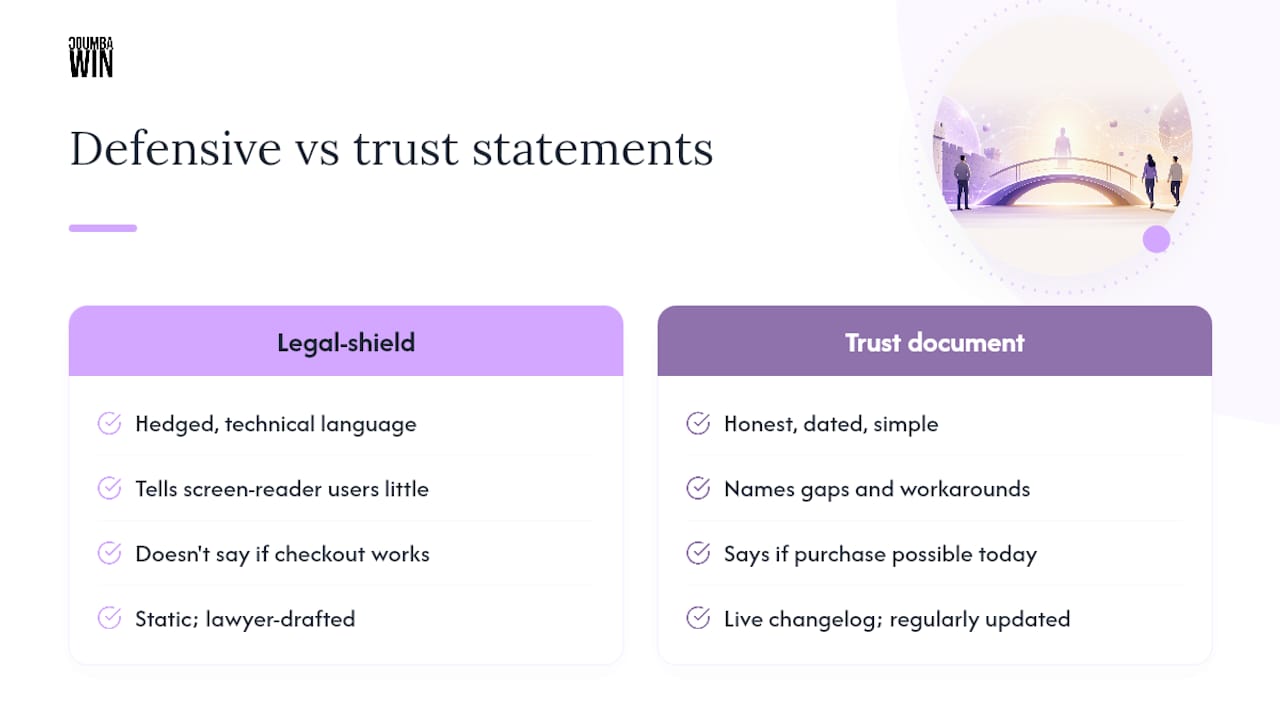
The conventional advice, “get a lawyer to draft it,” misses the point entirely. Lawyers protect you from liability; they don’t tell you whether a blind user can navigate your checkout flow. The teams that get this right treat the statement as a live changelog: they name the gap, they name the workaround, they name a date, and they update it when the gap closes.
If you do only one thing after reading this, publish something honest and dated in your footer before you spend a dollar on a full audit. A three-sentence honest statement beats a polished one that’s been sitting untouched since launch.
— Coumba Evelyn
Sources
- Developing an Accessibility Statement | W3C WAI
- Section508
- DOJ extends accessibility deadline to April 2027 — Policy Matters
- Digital
FAQ
Can you provide an example of a website accessibility statement?
Yes. A minimal version reads: “We are committed to making our website usable by everyone. We aim to meet WCAG 2.1 Level AA. Some older PDFs are not yet fully tagged; email us and we’ll provide an alternative format within two business days.” Longer versions add named limitations, audit dates, and a formal complaint path.
Do I need to have an accessibility statement on my website?
Federal agencies and many state and local government sites are required to publish one, with DOJ deadlines beginning April 24, 2026 for larger entities. Private businesses aren’t always legally mandated to post one, but it’s strongly recommended since the ADA applies broadly to businesses open to the public.
How do I write an accessibility statement?
Start with a commitment sentence, name your standard (WCAG 2.1 or 2.2 AA), describe known limitations in plain language with workarounds, and include a contact method with a realistic response time. Keep technical jargon out of it entirely.
How do I make my website WCAG compliant?
Combine automated scanning tools with manual keyboard navigation testing, a screen-reader pass, and, ideally, feedback from real assistive-tech users, since automated tools alone miss most real-world barriers. Fix issues by conformance level, starting with anything blocking basic navigation or forms.