
What Is a Design System? A 2026 Guide for Teams

What Is a Design System? A 2026 Guide for Teams
A design system is defined as a structured set of reusable components, documented standards, and shared design tokens that gives product teams a single source of truth for building consistent digital products. Think of it as the rulebook, the parts catalog, and the team handbook all rolled into one. The Nielsen Norman Group and W3C both recognize design tokens as a foundational standard within modern systems. Without one, you get the classic “junk drawer” situation: five slightly different button styles, three shades of brand blue, and a developer who swears the old Figma file is the real source of truth. A well-built design system ends that chaos before it starts.
What is a design system, really?
A design system is more than a Figma library or a folder of components. It is a formal agreement between design and engineering about how a product should look, behave, and scale. The design system definition includes governance processes: who owns it, how updates get released, and how decisions get documented. That governance layer is what separates a real system from a glorified style guide. Without it, even the prettiest component library goes stale within months.
The term “design system” is the recognized industry standard. You may also hear “component library” or “pattern library,” but those describe only one layer of the full system. A complete design system wraps those libraries inside documentation, usage guidelines, and a maintenance process. Coumba Win Design builds with this full definition in mind, not just the pretty parts.

What are the key elements of a design system?
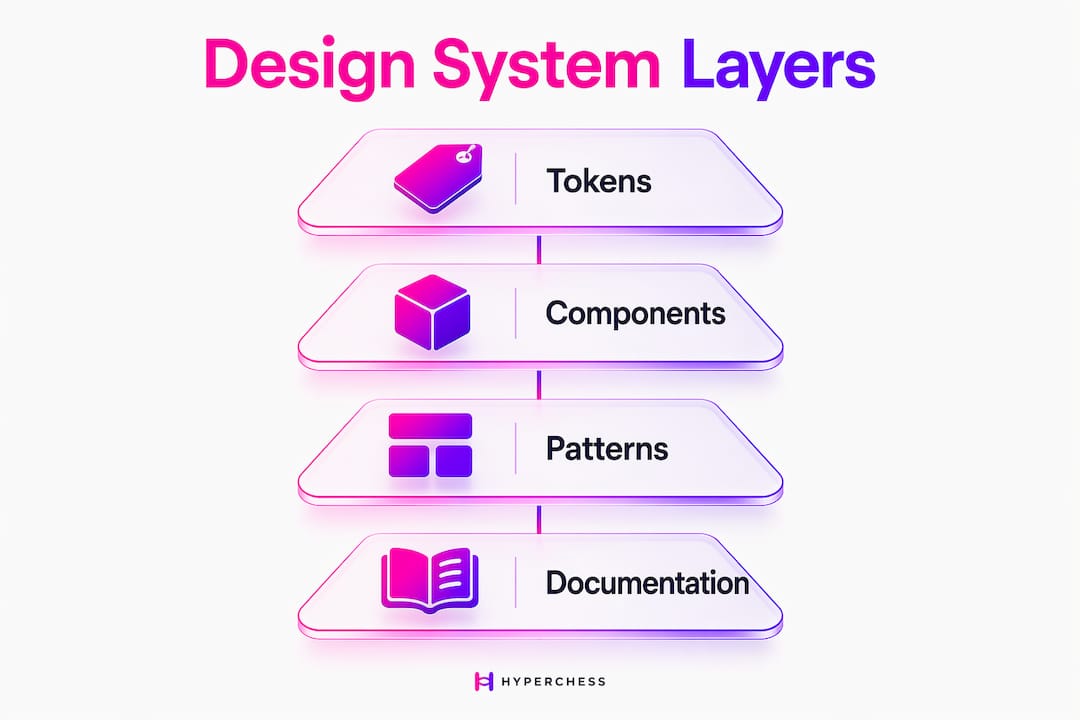
A modern design system has four layers, and skipping any one of them causes the whole thing to wobble.
| Layer | What it is | Example |
|---|---|---|
| Foundations (tokens) | Named values for color, spacing, and typography | color-primary: #1A1A2E |
| Components | Reusable UI pieces built from tokens | Buttons, modals, form inputs |
| Patterns | Composed layouts for common scenarios | Login flows, empty states, onboarding |
| Documentation | Guidelines, accessibility notes, and code standards | Usage rules, do/don’t examples |
The four essential layers work as a stack. Tokens feed components. Components combine into patterns. Documentation explains all three. Pull out any layer and teams start making local decisions that contradict each other.
Design tokens deserve special attention because they are the most commonly skipped layer. A token is a named value, like spacing-md: 16px, that gets used across every component. When you change the token, every component updates automatically. That is the difference between a system that scales and one that requires a find-and-replace nightmare every time the brand refreshes.
Pro Tip: Set up your token naming convention before you build a single component. Renaming tokens after the fact breaks references across your codebase and your Figma library simultaneously.
Why do design systems matter for your product?
The business case for design systems is no longer just about looking consistent. Teams save approximately 25% of their total work week after implementing a design system. That is one full day per person, per week, redirected from repetitive UI decisions to actual product thinking.
Here is what that efficiency actually looks like in practice:
- Faster design handoffs. Developers reference the component library instead of interpreting mockups. Fewer back-and-forth Slack messages, fewer “what font size is this?” moments.
- Better collaboration. Designers and engineers share a common vocabulary. When a PM says “use the card component,” everyone knows exactly what that means.
- Brand consistency at scale. Every new feature, every new product line, every new market launch starts from the same foundation. Brand consistency directly impacts customer retention and revenue.
- Reduced cognitive load. Design systems prevent inconsistent UI buildup, the slow accumulation of one-off components that confuse users and bloat codebases.
- Stronger product craft in the AI era. As AI tools generate more UI, a design system acts as the quality filter that keeps generated output on-brand and accessible.
Design systems have evolved from efficiency tools into strategic assets for global scaling and revenue impact. That shift matters for project managers especially. A design system is not a design team expense. It is a product infrastructure investment with measurable returns.
What are the biggest misconceptions about design systems?
The most dangerous misconception is treating a design system as a one-time project. You build it, you ship it, you move on. That approach produces systems that go obsolete within a year. A design system is a living product. It needs owners, release cycles, and a roadmap just like any other product your team ships.
A second misconception: the library is the system. Many teams mistake the Figma library or Storybook instance for the full system. The tools are just the surface. The system is the agreement, the governance, and the process running underneath those tools. When that governance is missing, components drift out of sync with production code, documentation goes stale, and teams stop trusting the system entirely.
A few other failure modes worth knowing:
- No clear ownership. If nobody owns the system, nobody maintains it. Assign a dedicated team or at least a named steward.
- No versioning. Teams need to know which version of a component they are using and when breaking changes are coming.
- No contribution process. When teams cannot add to the system, they build around it. That creates the exact fragmentation the system was meant to prevent.
- Wrong fit for team size. Not every organization benefits from a full design system. A two-person startup with one product may create more overhead than value by building one prematurely.
Pro Tip: Treat your design system like a product launch. Write a brief, assign an owner, set a release cadence, and schedule quarterly reviews. Systems without governance become expensive technical debt.
How do you create a design system from scratch?
Building a design system is not a weekend project, but it is also not as intimidating as it sounds when you break it into phases.
- Audit your existing UI. Catalog every component, color, and pattern currently in production. You will find duplicates, inconsistencies, and orphaned styles. That audit tells you what to standardize first.
- Define your foundations. Set your design tokens: color palette, typography scale, spacing system, and border radius values. These become the DNA of every component you build.
- Build core components. Start with the highest-frequency components: buttons, inputs, typography, and navigation. Build them from your tokens so changes propagate automatically.
- Document as you go. Write usage guidelines, accessibility notes, and code examples for every component. Documentation written after the fact is documentation that never gets written.
- Establish governance. Decide who owns the system, how contributions get reviewed, and how releases get communicated to consuming teams.
- Integrate into workflows. Connect your system to your version control, your design tool, and your CI/CD pipeline. A system that lives outside the workflow gets ignored.
- Iterate based on feedback. Collect input from the teams using the system. The best design systems evolve through real usage, not theoretical planning.
For teams building scalable web applications, connecting your design system to a typed component framework like React with TypeScript adds an extra layer of consistency between design intent and production output.
Small teams should start with tokens and two or three core components, then grow the system as the product grows. Large teams need governance structures and contribution workflows from day one, or the system fractures under the weight of competing priorities.
Key Takeaways
A design system is a living product, not a deliverable. Teams that treat it as infrastructure rather than a project see the strongest long-term returns in speed, consistency, and product quality.
| Point | Details |
|---|---|
| Four-layer structure | Every system needs tokens, components, patterns, and documentation to function without gaps. |
| 25% time savings | Teams reclaim roughly one full workday per week after implementing a design system. |
| Governance is non-negotiable | Without ownership, versioning, and release cycles, even well-built systems go obsolete. |
| Not always the right fit | Small teams with limited resources may create more overhead than value by building too early. |
| Strategic asset, not just a tool | Design systems now drive brand consistency, customer retention, and product scaling at a business level. |
What I’ve learned from watching teams get this wrong
I have watched a lot of teams pour serious energy into building beautiful component libraries and then wonder why nobody uses them six months later. The pattern is almost always the same: they built the artifact but skipped the agreement. No owner, no release process, no way for other teams to contribute without going rogue.
The teams that get it right treat the design system like a product with actual users. Those users are the designers and developers on every other team. They have needs, frustrations, and workarounds. The best design system teams I have seen run office hours, collect feedback, and ship release notes the same way a product team ships changelogs.
The other thing I keep coming back to: design systems are an act of trust. When a developer reaches for a component, they are trusting that it is accessible, tested, and up to date. When a designer uses a token, they are trusting that it maps correctly to production. That trust takes time to build and about five minutes of neglect to destroy. Treat the system like something people are depending on, because they are.
The 2026 context makes this even more pressing. AI tools now generate UI at a pace no team can manually review. A design system is the quality gate that keeps generated output from fragmenting your product. That is not a nice-to-have anymore. It is infrastructure.
— Coumba Evelyn
Coumba Win Design’s tools for building your system
Getting a design system off the ground is one thing. Keeping it coherent as your product grows is where most teams need backup.
Coumba Win Design offers a style guide built around the exact foundations covered here: tokens, typography, color systems, and code standards that map directly to production. The component library gives teams a working starting point instead of a blank canvas. Both resources follow the four-layer structure that makes design systems actually last. If you are building a product and want a system that scales with you rather than against you, these are worth a look.
FAQ
What is the design system definition in simple terms?
A design system is a shared set of components, tokens, and documentation that helps teams build consistent digital products faster. It acts as a single source of truth for both design and engineering.
What are design tokens and why do they matter?
Design tokens are named values, like colors, spacing, and font sizes, that feed every component in the system. Changing a token updates all components at once, which makes brand updates and accessibility fixes far less painful.
How long does it take to build a design system?
A minimal system with core tokens and five to ten components can take four to eight weeks for a small team. A full system with governance, documentation, and contribution workflows typically takes several months and requires ongoing investment.
What is the difference between a design system and a component library?
A component library is one layer inside a design system. A full design system also includes design tokens, compositional patterns, documentation, and governance processes that keep everything aligned over time.
When should a team not build a design system?
Teams with fewer than five people working on a single product may find the overhead outweighs the benefits early on. A lightweight style guide and a small shared component set often serve small teams better until the product and team grow.
Recommended