The Role of Prototyping in Product Design

The Role of Prototyping in Product Design
Prototyping in product design is the process of creating early, testable models of a product to gather feedback, validate ideas, and reduce costly errors before full development begins. Known formally as iterative design validation, prototyping sits at the heart of every successful product launch. Tools like Figma, UXPin, and Alloy have made it faster and cheaper than ever to build testable models at every stage. Companies that commit to prototyping early reduce development costs by 30 to 33% and cut time-to-market in half. That’s not a nice-to-have. That’s a competitive advantage.
What is the role of prototyping in product design?
Prototyping gives your team something real to react to. Instead of debating abstract wireframes in a meeting room, you put a clickable model in front of a real user and watch what happens. What you learn in 30 minutes of prototype testing would take weeks to uncover after a full build.
The core role of prototyping in product design breaks down into three jobs:
-
Reveal usability problems early. Navigation confusion, unclear calls to action, and broken user flows all surface during prototype testing, not after launch.
-
Validate assumptions before committing resources. You think users want a dashboard. A prototype tells you they actually want a single-screen summary. Big difference.
-
Align your team around a shared vision. A clickable prototype communicates design intent better than any spec document ever will.
Low-fidelity prototypes (paper sketches, basic wireframes) are your go-to for early concept testing. They’re fast, disposable, and perfect for testing flow and structure without getting distracted by color or typography. High-fidelity prototypes, built in tools like Figma or UXPin, replicate the final product’s look and interaction feel. They’re what you use when you need to test specific UI decisions or prepare for stakeholder sign-off.
Pro Tip: Build scenario-driven prototypes. Give users a specific task (“Find the checkout button and complete a purchase”) rather than asking them to explore freely. You’ll get far more useful feedback, and you’ll spot the exact friction points that matter.

How does prototyping reduce costs and speed up development?
Here’s the number that should make every founder sit up straight: fixing a bug after launch costs up to 100 times more than catching it during prototyping. That’s not a typo. One hundred times. A problem that costs $500 to fix in a prototype costs $50,000 to fix in production.
The math behind prototyping’s ROI is straightforward. Allocating 5 to 15% of your development budget to prototyping prevents the kind of expensive production fixes that derail timelines and burn through runway. Rapid prototyping also compresses feedback cycles, saving days to weeks of engineering time per feature.
| Scenario | Without prototyping | With prototyping |
|---|---|---|
| Usability issues discovered | Post-launch (expensive) | Pre-development (cheap) |
| Stakeholder alignment | Multiple revision rounds | Single prototype review |
| Engineering rework | High (late-stage changes) | Low (early course correction) |
| Time-to-market | Slower (more surprises) | Up to 50% faster |
| Development cost | Higher (avoidable errors) | 30 to 33% lower |
The table above isn’t theoretical. These are the outcomes that separate product teams that prototype consistently from those that treat it as optional. Treating prototyping as optional is one of the most expensive mistakes a startup can make, and it’s shockingly common.
Pro Tip: Don’t prototype everything equally. Identify your highest-risk assumptions (the ones where being wrong would kill the product) and prototype those first. Save your fidelity budget for the decisions that matter most.
What types of prototypes should you use and when?
Not all prototypes are created equal, and using the wrong type at the wrong stage wastes time and money. Prototype fidelity should match the questions you’re trying to answer: low-fidelity for concept validation, high-fidelity for usability and interaction testing.
Here’s how the three main fidelity levels break down in practice:
| Prototype type | Fidelity level | Best used for | Common tools |
|---|---|---|---|
| Paper sketches / wireframes | Low | Concept testing, flow mapping | Pen and paper, Balsamiq |
| Interactive mockups | Mid | Navigation testing, layout decisions | Figma, Sketch |
| Functional prototypes | High | Usability testing, stakeholder demos | UXPin, Framer |
| Physical prototypes | Variable | Hardware, packaging, ergonomics | 3D printing, CNC machining |
| Code-based prototypes | High | Dev handoff, interaction accuracy | UXPin Merge, React |
The physical vs. digital distinction matters more than most people acknowledge. If you’re designing a physical product (think consumer hardware, packaging, or wearables), paper and screen prototypes only get you so far. The Coumba Win 3D Shell case study is a sharp example of how physical prototyping reveals ergonomic and manufacturing constraints that no digital mockup would catch.
For digital products, code-based prototypes built with tools like UXPin Merge deserve more attention than they get. Code-backed prototypes reduce engineering time by up to 50% by eliminating the gap between design and development. When your prototype is built from real production components, the handoff stops being a translation exercise and starts being a direct transfer.
The key principle here: effective prototyping is iterative and disposable. Invest only as much fidelity as you need to answer a specific question, then move on. Don’t fall in love with your prototype.
How do you integrate prototyping into your team’s workflow?
Prototyping works best as a team sport, not a solo designer activity. Cross-functional prototyping (involving designers, engineers, product managers, and stakeholders together) identifies technical constraints early and prevents the last-minute surprises that blow up sprint timelines.
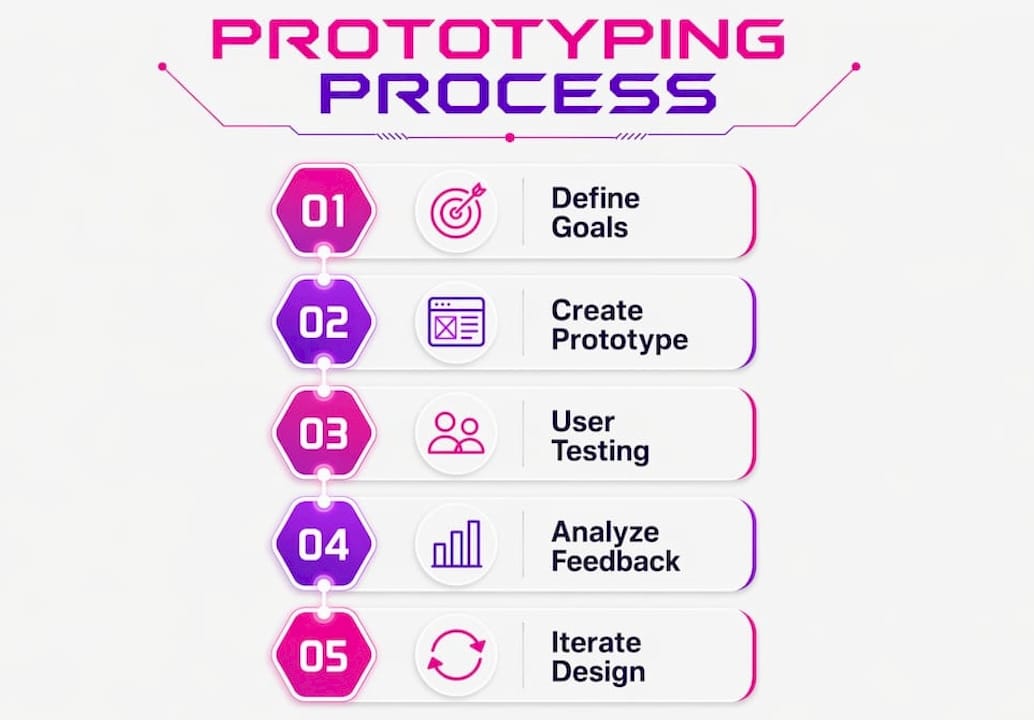
Here’s a workflow that actually holds up under startup pressure:
-
Define the question. Before opening Figma, write down exactly what you need to learn from this prototype. “Does the onboarding flow feel intuitive to a first-time user?” is a testable question. “Is the design good?” is not.
-
Choose the right fidelity. Match your prototype type to your question (see the table above). Don’t build a high-fidelity prototype to test a concept you haven’t validated yet.
-
Build to think, not to show. Your prototype is a thinking tool. It doesn’t need to be pretty. It needs to be testable.
-
Test with real users. Aim for 4 to 5 testing sessions per feature to get reliable validation before committing to development.
-
Debrief as a team. Share findings with engineers and PMs immediately. Prototypes create a shared reality for stakeholders that reduces miscommunication and speeds up decisions.
-
Iterate, then build. Only move to full development once your prototype has answered the core questions. Anything else is expensive guessing.
Teams that reuse existing design systems and code fragments in their prototypes (rather than building from scratch every time) move significantly faster. Tools like UXPin Merge and Alloy support this kind of component reuse directly.
Pro Tip: Avoid over-polishing your prototypes. A prototype that looks too finished signals to stakeholders that decisions are locked in, which shuts down honest feedback. Keep early prototypes deliberately rough.
Common prototyping mistakes and how to avoid them
The biggest prototyping mistake isn’t a technical one. It’s treating the prototype as a deliverable rather than a learning tool. When that happens, teams spend hours perfecting pixel spacing in a prototype that should have been a five-minute sketch.
Watch out for these specific traps:
-
No clear testing goal. If you don’t know what question you’re answering, you can’t design a useful prototype. Define success criteria before you start building.
-
Going high-fidelity too early. High-fidelity prototypes are expensive to change. If you haven’t validated the core concept yet, a paper sketch will teach you more in less time.
-
Ignoring user feedback. This sounds obvious, but it happens constantly. Teams run prototype tests, hear uncomfortable feedback, and then rationalize it away. The feedback is the point.
-
Scope creep in prototyping. Prototypes have a way of growing. Scope creep turns a two-day prototype sprint into a two-week project. Timebox your prototyping sessions ruthlessly.
-
Skipping prototyping entirely. This is the most expensive mistake of all. Skipping prototyping increases development risk and leads to costly errors that could have been caught in an afternoon of testing.
AI-assisted prototyping tools now reduce prototyping time from days to minutes by generating prototypes from existing designs or text prompts. That removes the “we don’t have time to prototype” excuse entirely. If AI can build a testable prototype in minutes, the only reason to skip prototyping is stubbornness.
Pro Tip: Write your success criteria before you open any design tool. “Users can complete checkout in under 3 steps without asking for help” is a success criterion. “The design looks clean” is not. Criteria you can measure keep your prototype focused.
Key takeaways
Prototyping is the single most cost-effective practice in product design, reducing development costs by up to 33% and cutting time-to-market by 50% when applied consistently and with clear testing goals.
| Point | Details |
|---|---|
| Match fidelity to your question | Use low-fidelity for concept testing and high-fidelity for usability and interaction validation. |
| Prototype high-risk assumptions first | Focus early prototyping effort on the decisions where being wrong would cost the most. |
| Test with 4 to 5 users per feature | This cadence provides reliable validation without over-investing in research before development. |
| Treat prototypes as disposable | Build only as much fidelity as needed to answer one specific question, then iterate or discard. |
| Make it a team activity | Cross-functional prototyping catches technical constraints early and aligns stakeholders faster. |
Why I think most teams are still getting prototyping wrong
I’ve watched a lot of product teams treat prototyping like a formality. They build one prototype, show it to the CEO, get a thumbs up, and ship. That’s not prototyping. That’s theater.
The teams I’ve seen get real results from prototyping share one habit: they prototype to learn, not to validate what they already believe. There’s a huge difference. When you prototype to learn, you welcome the user who can’t find the button. When you prototype to validate, you explain to that user where the button is and call it a success.
The rise of AI-powered prototyping tools genuinely excites me, not because they make prototyping faster (though they do), but because they remove the friction that teams use as an excuse to skip it. When Alloy can generate a testable prototype from a text prompt in minutes, “we didn’t have time” stops being a valid reason to ship untested assumptions.
My honest recommendation: embed prototyping as a non-negotiable step in your product development process, not a nice-to-have. The teams that treat it as optional are the ones rebuilding features six months after launch and wondering why their conversion rates are flat. You can see this pattern play out across product design case studies again and again.
— Coumba Evelyn
Ready to build products that actually work?
At Coumba Win Design, we work with founders who know that design is a competitive advantage, not a cost center. Prototyping is baked into everything we do, from early concept sketches to high-fidelity interactive models that your engineering team can build from directly. We’ve helped startups validate ideas faster, align stakeholders without endless revision rounds, and launch products that users actually love.
If you’re building something and want a design partner who treats prototyping as a core practice (not an afterthought), start with our design style guide to see how we approach product design from the ground up. Or if you’re heading toward a launch or demo event, our Demo Day Kit gives you everything you need to show up polished and ready in 14 days.
FAQ
What is the role of prototyping in product design?
Prototyping in product design is the practice of creating testable, early-stage models to validate ideas, identify usability issues, and reduce development risk before full production begins. It serves as the primary tool for gathering real user feedback and aligning teams around a shared product vision.
How much can prototyping reduce development costs?
Companies that prototype consistently reduce development costs by 30 to 33% and reach market up to 50% faster than teams that skip the prototyping phase. The cost of fixing a problem in a prototype is up to 100 times lower than fixing the same problem after launch.
When should you use low-fidelity vs. high-fidelity prototypes?
Low-fidelity prototypes (sketches, basic wireframes) work best for testing concepts and user flows early in the design process. High-fidelity prototypes are the right choice when you need to test specific UI interactions, prepare for stakeholder demos, or finalize design before engineering handoff.
How many prototype testing sessions do you need per feature?
The optimal cadence is 4 to 5 testing sessions per feature to get reliable validation before committing to development. Fewer sessions risk missing critical usability patterns; more sessions offer diminishing returns.
What are the most common prototyping mistakes?
The most common mistakes include building high-fidelity prototypes before validating the core concept, running tests without defined success criteria, and ignoring user feedback that contradicts existing assumptions. Treating prototyping as optional is the costliest mistake of all, as it increases development risk and leads to expensive post-launch rework.
Recommended