The Design Handoff Process: A Founder's Field Guide
The Design Handoff Process: A Founder’s Field Guide
The design handoff process is how a finished design gets from the people who imagined it to the people who build it, along with the intent, rules and specs behind it. Done well, it is a conversation that starts early and continues through QA. Done badly, it is a Figma link dropped in Slack at 5 p.m. on a Friday (we’ve all been there, and nobody enjoyed it 😅).
This guide walks through what a handoff actually contains, a step-by-step process you can steal, the gaps that cause most rework, and how to set it up when your team is three people and a very loyal dog.
TL;DR
- A handoff transfers intent and behavior, not just pixels. Specs alone leave developers guessing.
- Start before the designs are “done.” Early developer input is cheaper than late rebuilds.
- Package states, edge cases, responsive rules, accessibility and content, then walk through it live.
- Keep one source of truth and a visible changelog, and stay available through build and QA.
- Treat it as a loop, not a finish line.
Table of Contents
- What the design handoff process really is
- What developers actually need from you
- A step-by-step design handoff process
- Keep one source of truth
- Common handoff gaps (and fixes)
- Don’t leave accessibility for later
- Special cases that need extra care
- Our perspective: handoff is a design decision
- When you’d rather not do this alone
- A lightweight handoff for tiny teams
- FAQ
- Sources
What the design handoff process really is
The textbook definition is simple. The Interaction Design Foundation describes handoff as transferring a designer’s intent, knowledge and specifications for implementation, and not merely delivering visual files. That can include user flows, interactions, animation, copy, responsive breakpoints, accessibility, data validation and the business logic behind decisions.
The word “handoff” is the problem, honestly. It suggests a baton pass where one person lets go and the other runs. The U.S. government’s Digital.gov guide on design and implementation says the opposite: design teams can’t just hand off designs, because questions will need to be worked out together. Designers should work with implementers to resolve those questions, run a small pilot and help build an implementation plan.
So think of it less as a handoff and more as a handshake that lasts a few weeks.
Who is in the room
A complete handoff usually involves designers, developers, product managers, UX writers and QA testers, according to the Interaction Design Foundation. Developers check feasibility. QA verifies that what shipped matches what was designed and works correctly. At a startup, one person may wear four of those hats. That’s fine. The roles still need to happen, even if they happen over one very long coffee.
What developers actually need from you
Ask a developer what they want and you’ll hear a surprisingly consistent list. Here’s the version we use on projects.
The visual layer
- Organized design files. Meaningful layer names matter more than you’d think. Figma’s designer handbook explains that developers use layer names when inspecting a design and translating its structure into code. It also suggests removing unnecessary layers and preconfiguring export settings for images, icons and illustrations in the formats and sizes developers need.
- Measurements and layout rules. The UX Design and Technology guidelines say specs should cover measurements, padding, margins, alignment and responsive requirements across screen sizes and devices.
- Style guide and reusable components. Tokens, type scales, color roles and component variants beat one-off values every time. If you’re building a design system, this is where it earns its keep.
The behavior layer
This is where handoffs usually fall apart. A Miro guide to developer-designer handoffs says a handoff package should cover interaction behavior, complete flows and business logic, form validation, non-happy-path states, responsive behavior, accessibility and representative content. In plain English:
- What happens on hover, focus, press and disabled?
- What does the screen look like while loading? When it’s empty? When it errors out?
- What are the validation rules, and what does the error message say?
- What happens with a very long name, or a very short one?
Static mockups show the sunny-day version. Developers still have to build the rainy one, and if you didn’t design it, they’ll invent it. Falcon’s handoff guide makes the same point: the purpose of handoff is to transfer intent, behavior and decision context so engineers aren’t forced to invent product rules.
The “why” layer
The cheapest, most overlooked item. Write down why the checkout has three steps, or why the pricing toggle defaults to annual. Interaction Design Foundation contributor Szymon Adamiak argues that explaining the design rationale helps engineers propose solutions to the real problem, and that early developer involvement exposes technical constraints while alternatives are still inexpensive.
A step-by-step design handoff process
Here’s a workable sequence, drawing on the research above and the way we run projects at Coumba Win.
1. Pull developers in before you think you’re ready
This feels backwards and it’s the single biggest upgrade. UXPin’s guidance treats handoff as a process that begins during discovery, not a final event, and recommends early designer-engineer talks about technical constraints and involving developers in research and design sprints. Nielsen Norman Group goes further: involve developers before design is finished, leave time for comments in the design file before the review meeting, and use the meeting to resolve them.
Practically, that means a 30-minute “is this buildable?” review on rough flows. You will learn that the fancy animation you love needs a library you don’t have. Better to learn it on Tuesday than in QA.

2. Confirm what is ready, and say so
Designers often work on a messy canvas. Developers shouldn’t have to guess which frames are final. Figma’s developer-handoff guide recommends clearly distinguishing work that is ready for implementation from work still in progress. A simple status label on each frame, plus a dedicated “Ready for dev” page, does the job.
3. Break the work into digestible chunks
Nielsen Norman Group recommends smaller, digestible design specifications rather than one giant document, and says designers should involve developers in deciding how work is split. A 40-page spec for the whole app gets skimmed. A one-page spec for the onboarding flow gets read.
4. Write the development ticket like a mini-brief
Per the same NN/G guide, a development issue should state the design goal, scope and exclusions, functional and nonfunctional requirements, affected use cases, and risks with mitigations. Attach a screenshot and link the design file, and make sure the screenshot matches the current design. Stale screenshots are a classic source of “but the mockup said…” arguments.
5. Package the specs, prototype and edge cases
Use the lists above as your checklist. A short table helps you check you’ve covered everything:
| Item | What to include | Why it saves time |
|---|---|---|
| Flows | Full journeys, entry and exit points | Prevents dead ends |
| States | Loading, empty, error, success, disabled | Avoids invented UI |
| Responsive rules | Breakpoints, reflow, hidden elements | Fewer layout bugs |
| Interactions | Hover, focus, motion, timing | Consistent feel |
| Accessibility | Contrast, focus order, labels, alt text | Not bolted on later |
| Content | Real copy, representative data | Realistic layouts |
| Assets | Exports in needed formats and sizes | No “can you resend that?” |
6. Walk through it live
A recorded or live walkthrough beats any document. The UX Design and Technology guidelines recommend a handoff meeting, collaboration and version-control tools, and feedback loops. Show the flow, narrate the tricky bits, and let developers interrupt. The interruptions are the point.
7. Keep questions and decisions in one place
Miro’s guide suggests recording questions and decisions in one place and staying involved through implementation and QA. Pick a channel or a ticket thread and make that the home for answers. If a decision lives only in a DM, it doesn’t exist.
8. Stay involved through build and QA
During implementation, keep the loop tight with walkthroughs, stand-ups, screenshots or staging links, and annotated comments, as the UX Design and Technology guidelines put it. When the design changes, NN/G says to discuss the update with developers, include an implementation timeline, and document any discrepancy between ticket screenshots and the design file.
Keep one source of truth
If there’s a single habit to adopt this week, it’s this one. Smashing Magazine recommends treating the handoff file as the single source of truth and updating it directly when designs change, rather than pointing developers to potentially outdated references. Add a changelog so people can see what moved since last sprint, and use a design system to keep design and code aligned.
If your assets are scattered across Drive, Slack threads and someone’s desktop, fix that first. Our posts on design asset management best practices and managing design assets as you grow cover the folder and naming habits that make handoff painless.
Common handoff gaps (and fixes)
Miro’s handoff best-practices piece names five common breakdowns. Here they are, with the fix we’d reach for.
| Breakdown | What it looks like | Fix |
|---|---|---|
| Missing rationale | “Why is it like this?” | Add a short intent note per screen |
| Unspecified edge cases | Developers improvise errors and empty states | Design them before handoff |
| Static mockups that omit behavior | Hover, motion and transitions are guessed | Add a prototype and annotations |
| Slow async question loops | Two-day waits for a yes or no | Schedule a standing 15-minute sync |
| Developers involved only after designs are “final” | Late surprises about feasibility | Invite them to early reviews |
Digital.gov points at a deeper cause: linear handoffs leave each team unaware of the next team’s constraints and needs. Its fix is overlap. Teams communicate, support a pilot and help develop the implementation plan together.
Don’t leave accessibility for later
Accessibility is the item most often tacked on after launch, and it’s far more expensive to retrofit. Put it in the handoff: color contrast values, focus order, keyboard behavior, labels, alt text guidance and heading structure. If you want a primer on how accessibility overlaps with SEO, that’s a good place to see why it pays off twice.
Our own guides go deeper on the practical side: a 6-step color contrast workflow for designers and engineers, a WCAG 2.2 checklist with test steps, and a look at the role of accessibility in UX. If you’re already live, a website accessibility audit shows you where the gaps are.
Special cases that need extra care
Typography
Type is where “it looks different in the browser” complaints are born. Specify font families, weights, size and line-height at each breakpoint, and fallbacks. Our post on typographic web design for developers covers what to hand over.
Motion
Motion is hard to describe in a still frame. Hand over duration, easing, trigger and what happens when someone has reduced-motion turned on. More on that in the role of motion design in brand engagement.
Mobile
Design the thumb-reach reality, not just a shrunken desktop. See our notes on mobile UX design best practices for startups.
SEO
Heading hierarchy, metadata fields and image handling all start in design. A design that ignores them forces rework later; see SEO-friendly web design.
Our perspective: handoff is a design decision
Here’s where we land, and yes, we have opinions (strong ones, fueled by too much coffee ☕).
We work with startups where the founder, the designer and the developer might be in the same Slack channel, or might be three contractors in three time zones. In both cases, we’ve learned that the handoff is not the end of design. It’s the first moment your design meets reality, and reality has opinions.
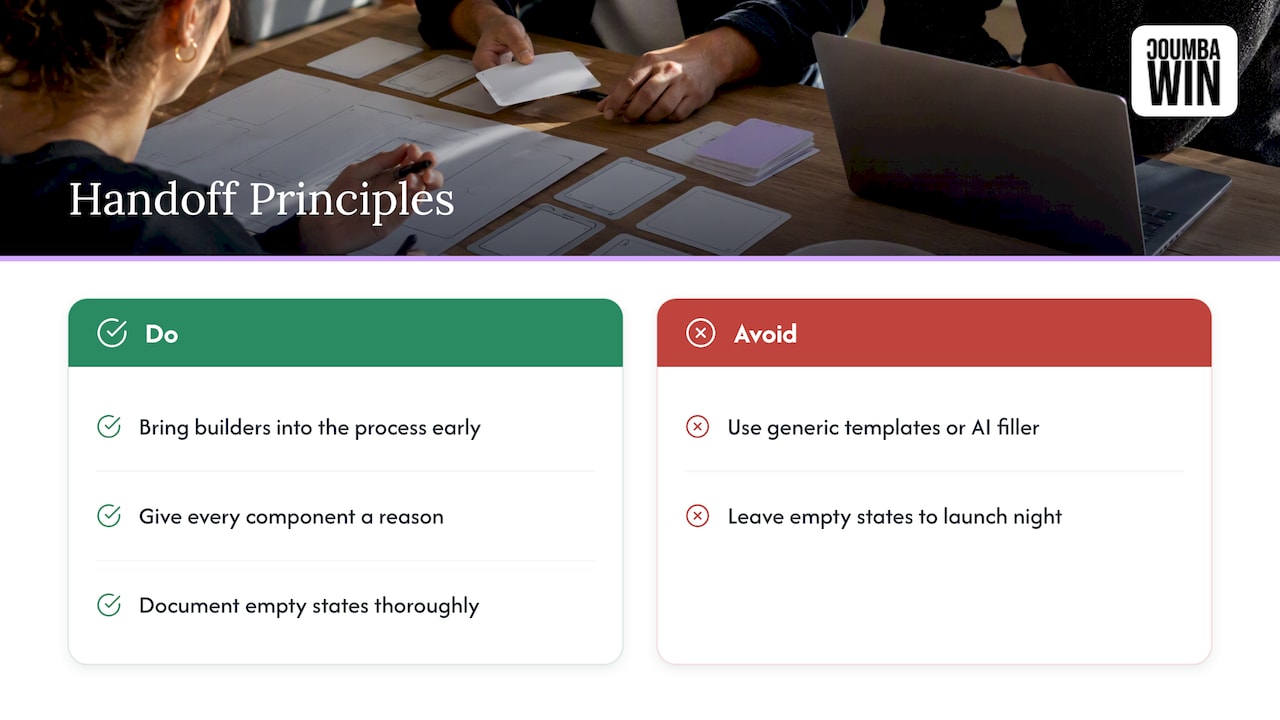
So we do a few things differently. We bring builders into the process early, because a bold idea that can’t ship at your current stage isn’t bold, it’s just expensive. We reject generic templates and AI-generated filler, which means every component has a reason, and that reason goes into the file. And we’d rather over-document an empty state than watch it get improvised at 11 p.m. the night before a launch or a Demo Day.
The founders who get the most out of design treat it as a competitive advantage, and that includes the unglamorous bit where design becomes a working product. If the build doesn’t match the intent, the strategy never reaches your customer.
— Coumba Evelyn
When you’d rather not do this alone
If you’re a founder and your honest reaction to this list is “I need someone to just handle it,” that’s a normal reaction. Coumba Win designs and builds websites, UI and UX, pitch decks and more for startups, and we stay with the project through build so the thing that launches is the thing you approved. If you want to talk about a redesign or a first site, take a look at our web design and development services or see how we build in Webflow. You can also browse our style guide and components pages to see what a documented system looks like in practice.
A lightweight handoff for tiny teams
Not every startup needs the full ceremony. If you’re two people shipping a landing page, try this:
- Hold a 20-minute pre-build review of rough layouts.
- Mark final frames “Ready for dev” and name layers sensibly.
- Write one ticket per section, with a screenshot, a file link and the edge cases.
- Do one recorded walkthrough.
- Check the staging link side by side with the design before launch.
That’s it. Miro’s process perspective is that a lightweight, centralized, feedback-oriented handoff reduces rework by making readiness, decisions, questions and QA explicit. Lightweight doesn’t mean skipped.
A few finishing habits worth stealing:
- Use real content. Lorem ipsum hides overflow problems. Representative copy and data surface them.
- Name things the way you’ll say them. If the team calls it the “hero,” call the layer “Hero.”
- Run a pilot. Digital.gov suggests a small pilot before full rollout. Build one screen end to end, learn, then scale.
- Review after launch. Ten minutes on what slipped, and update the template.
FAQ
What is the design handoff process?
It’s the process of passing a finished design to the people who will build it, along with the intent, specs and behavior behind it. In practice it runs from early feasibility talks through a live walkthrough and on into implementation and QA. It works best as ongoing collaboration rather than a single file transfer.
What should I include when handing designs to developers?
Include organized files, final high-fidelity screens, an interactive prototype, a style guide and reusable components, plus measurements and responsive rules. Add the states people forget: loading, empty, error and disabled. Finish with accessibility requirements, real content and the reasoning behind key decisions.
When should the handoff start?
Before the designs are finished. Bring a developer into early reviews so technical constraints surface while changes are still cheap, then hold a formal walkthrough once screens are marked ready. After that, keep the channel open until QA signs off.
Do I need a special tool for design handoff?
Not necessarily. What matters is one source of truth, clear naming, documented states and a place to log questions and decisions. A design tool with an inspect mode helps, but it can’t explain intent on its own, so you still need notes and a conversation.
Sources
- Design and Implementation, Digital.gov
- Design Handoffs, Interaction Design Foundation
- How to Ensure a Smooth Design Handoff, Interaction Design Foundation
- Creating Design Specs for Development, Nielsen Norman Group
- The Designer’s Handbook for Developer Handoff, Figma
- Guide to developer handoff in Figma
- A Guide to Developer-Design Handoffs, Miro
- Design Handoff Best Practices: Beyond Static Mockups, Miro
- Designing A Better Design Handoff File In Figma, Smashing Magazine
- Development Handoff and Collaboration, UX Design and Technology guidelines
- Design Handoff: Specs, Tokens, and Context, Falcon
- Design Handoff: Creating a Better Process, UXPin
#DesignHandoff #StartupDesign #UXDesign #DeveloperHandoff